Authlib-Injector Server Setup Guide
Background
Server owners who use authlib-injector authentication can follow the method described in this tutorial to make HMCL display a dialog by default on startup, asking the user to create an account for the corresponding authentication server.
Method
Create an authlib-injectors.json file in the same directory as the HMCL launcher. The folder structure will then look like the figure below:
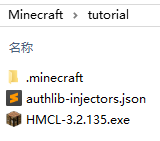
(Note: make sure that the packaged modpack does not contain an hmcl.json file, otherwise this will not take effect. That file is hidden by default, so you need to enable the display of hidden files.)
An example of the authlib-injectors.json file is shown below:
{
    "urls": [
        "https://example.yggdrasil.yushi.moe/"
    ]
}